Practical shopping guide
Buying a Used Camera in Japan: An Inspection Guide
A condition grade is a starting point. Your decision should depend on the specific unit, a test you understand and support you can actually use.
By PhotoMichi Japan · Updated
Research transparency: source checks and firsthand visits are kept separate. Editorial standards · Research log · Disclosure.
Jump to a section
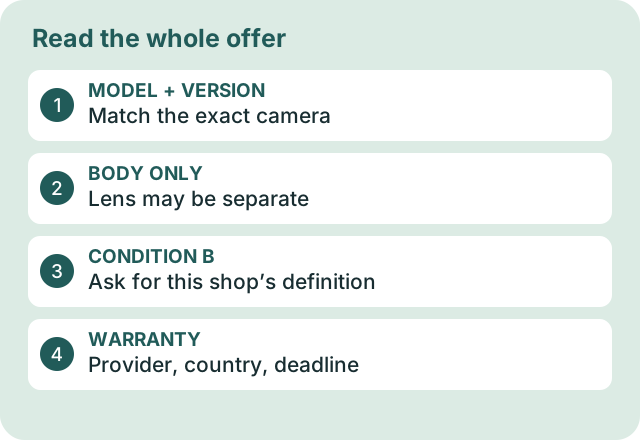
Bring the information and accessories you need
Write down the model of your current camera, lens mount and memory-card type. If practical, bring your own compatible lens or body and a card that contains no important files. Ask permission before mounting equipment, inserting a card or making test images. Never force a mount or open a sealed item yourself.
Allow time for the shop to prepare the equipment. An inspection is more useful when you know your priorities: travel stills, autofocus of moving subjects, video sound, viewfinder use or a particular lens. A short counter test does not prove long-term reliability.
Read the condition note, not only the letter grade
On a small screen, swipe across the table to compare all columns.
| Label | Plain meaning | What to ask |
|---|---|---|
| 中古 / chūko | Used | What has been checked and what is included? |
| キズ / kizu | Scratches | On the body, glass, screen or mount? |
| カビ / kabi | Mold / fungus | Where is it, and what effect does the shop report? |
| クモリ / kumori | Haze / clouding | May I see a test image and the condition explanation? |
| 動作未確認 / dōsa mikakunin | Operation not checked | Which functions remain untested? |
| ジャンク / janku | Junk / repair or parts condition | Is operation unguaranteed and the sale final? |
| 付属品 / fuzokuhin | Included accessories | Which battery, charger, caps and cables come with this unit? |
These are language aids, not a universal grading standard. Ask the retailer to explain its scale. Two shops using “A” or “B” need not be describing equivalent equipment. Read the full condition note even when the exterior looks clean. Use our condition-grade guide and comparison note to record the seller’s category, known defects, test status and terms separately.
A real example of lens fungus
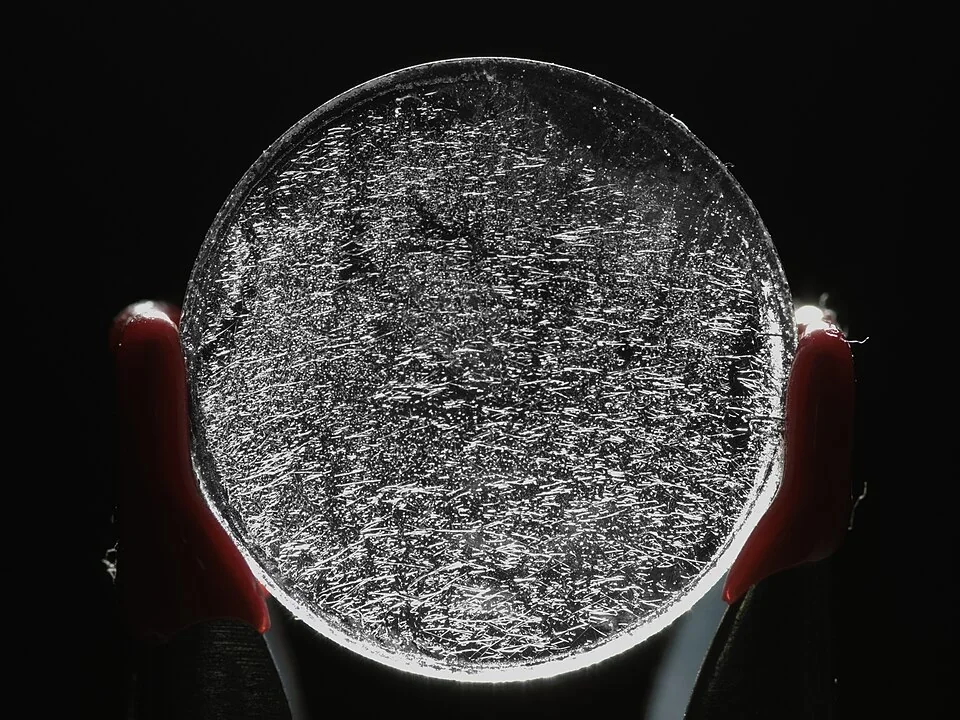
Use it to ask a better question: ask staff where the reported fungus is and what it means for this unit. Appearance alone cannot establish severity or image quality. Do not disassemble or clean the lens yourself.
For a concrete example, Kitamura’s used-camera page separates ordinary used gear from junk items and states that its junk items are not guaranteed to work and cannot be returned. Do not carry those specific terms over to another shop without checking.
A practical test sequence
- Identity and exterior: match the model and stock number to the quote. Look at the mount, battery door, card door, strap points and screws. Ask about any disclosed repair history.
- Power and controls: ask staff to power the unit. Try the buttons, dials, screen and viewfinder that matter to you. Select your required menu language on this unit. For a real model/version distinction, follow the source-based α7 III English-menu example.
- Capture and playback: take permitted test shots near and far, confirm focus where you intended, then review the files. A working screen alone does not prove successful recording.
- Your use case: test relevant autofocus modes, stabilization, video recording or external connections with staff assistance. Ask about functions you cannot test.
- Lens operation: try focus and zoom movement and permitted aperture control. Ask staff to describe scratches, haze or fungus. Do not touch the glass, sensor or shutter.
- Finish with the included items: compare the accessories on the counter with the written listing. Note anything you must buy separately.
Shutter count, when available, is only one piece of history. Do not turn a low count into a guarantee or assume a count can be read reliably from every model. Film-camera shutter accuracy, light leaks and long exposures may require specialist testing beyond a shop visit.
Use a clear buy / pause / leave decision
On a small screen, swipe across the table to compare all columns.
| Result | Action |
|---|---|
| Cosmetic wear explained; essential functions work; support is clear | Consider the price together with condition and accessories. |
| A critical function could not be tested | Pause. Ask for a demonstration or choose another unit. |
| You need a reliable trip camera but the item is untested or junk | Choose a tested alternative unless you knowingly want a repair project. |
| Unexplained faults, incompatible language or uncertain lens fit | Leave the purchase until the essential question is resolved. |
A hypothetical ¥4,000 saving is not useful if a required battery and charger cost more than that. For two used units, use the same-requirements comparison. If your alternative is buying at home, follow the Japan-versus-home quote guide, then enter actual replacement costs into the comparison tool. Keep untested functions separate from the price calculation.
Keep a record before leaving
Save the receipt, condition description, serial or stock number, stated accessories and shop contact route. Ask what you must do if a fault appears before your flight or after you return home. The warranty guide separates shop guarantees, manufacturer coverage and return conditions.
If the seller cannot give you a support answer that meets your needs, that uncertainty belongs in the purchase decision. A test is useful evidence; it is not a promise of a trouble-free camera.
Turn a test result into a decision
Illustrative situations, not reports of a particular shop or live offers.
A clean body, but no English menu
The cosmetic grade looks good and the price is attractive. You cannot find the language you need on the actual unit.
Ask staff to demonstrate that exact menu. If the required language is unavailable, a lower price does not solve the mismatch. Do not buy on a promise of a future firmware change.
A lens seems fine until you use your body
The mount fits, but the functions you need have not been tested together.
With permission, try the lens on your own compatible body. Check autofocus, aperture control and stabilization where applicable. A mounting fit alone is not a complete compatibility test.
The shop will not permit your planned test
A short counter visit cannot establish every fault. Staff may restrict handling or the time available.
Ask which checks the shop performed and what remedy applies if an undisclosed fault appears. If the uncertainty is unacceptable for your trip, leave the purchase unresolved.
A sample image looks different on playback
You see a dark spot, an odd colour or a soft frame, but have not isolated the cause.
Repeat with simple settings and ask staff for help. The lens, focus, exposure and display can affect the result. Do not diagnose a defect from one frame or attempt to clean the sensor in the shop.
Official pages linked in this guide were checked September 24, 2026. Selection advice, examples and checklists are our editorial guidance. We have not visited or tested these stores or products. Recheck hours, entry rules and item availability before travelling. Our source policy.